AI is the cat that’s now out of the bag, and everyone wants to see if it’s all just hype or the real deal. The industry has burned billions of dollars on projects like Metaverse, which can now be considered more or less failed.
The next frontier feels like AI, with no one really sure how well it is going. Students are worried about jobs, and businesses are wondering if the investment will really pay off.
First and foremost, AI is no longer just an LLM trapped inside a text box. It’s evolving into systems that can think, plan, take action, and get things done on their own.
The best part is you don’t need to be a six-figure earning engineer to undertake an AI agent project that you can build today.
No matter if you are a beginner who has never written a line of code, or a developer looking for a next weekend project, or an enterprise architect wondering about the state of multi-agent workflow development for production, this expert AI agents project guide is for you.
What Are AI Agents?
AI Agents are the next evolution of AI. From just your research assistant or help, it can now do and solve multi-step problems.
Technically speaking, an AI agent is an autonomous system that uses LLM as its brain. AI Agents are capable enough to perceive the environment, understand, reason, adapt, and take action until goals are reached.
What makes agents different from regular chatbots is the loop. A chatbot gives you one response per prompt. An agent can execute a 10-step workflow, hit multiple APIs, retry failed steps, and produce a final result, all without you having to supervise every move.
Here is what separates agents from everything that came before:
Independence to operate: They make decisions independently without needing you to guide every step.
Outcome led Behaviour: They break down big objectives into smaller actionable tasks and execute them one by one.
Access To Tools: They can browse the web, query databases, send emails, write code, and interact with external APIs.
Adaptability: They can adjust their approach based on what tools return, retrying when something fails or changing strategy when needed.
Collaboration: In multi-agent systems, individual agents can pass work to each other, each specializing in one task.
What Are the Different Types of AI Agent Projects?
Before diving into specific projects, it helps to understand the three broad categories based on how much coding is involved.
No-Code / Low-Code AI Agent Projects
These are for people who want to build functional agents without writing much (or any) code. Platforms like Flowise, LangFlow, and n8n offer drag-and-drop interfaces where you connect components visually. You load a template, add your API keys, plug in your data source, and your agent is live in minutes. Great for product managers, analysts, or anyone who wants to automate workflows fast.
API-Based AI Agent Projects
Here, you use an LLM provider’s API directly, like Anthropic’s API or OpenAI’s, and write code to handle the agent logic yourself. You get much more control over how tools are called, how memory is managed, and how the agent behaves. This is the sweet spot for developers who want flexibility without the overhead of a full framework.
https://youtu.be/44eFf-tRiSg?si=LiAFN9V16InKqCvF
Agentic Framework Projects
These are for builders who want to go deep. Frameworks like LangGraph, CrewAI, and LlamaIndex give you the infrastructure to build complex, multi-agent pipelines with fine-grained control over execution, state management, and orchestration. This is where production-grade systems live.
Tools Used to Build AI Agents
One of the most confusing parts of getting into agentic AI development is that there are a dozen frameworks, and everyone seems to have a different opinion on which one is best. Here is a clear breakdown of what exists and when to use each.
Low-Level APIs (Direct Control)
Anthropic API is the most straightforward low-level option. You manage your own message array, handle tool calls in a loop, and get clean, predictable behavior with minimal abstraction. If you want to understand exactly what is happening under the hood, start here.
OpenAI Responses API (released March 2025) is stateless by design and uses a previous_response_id for chaining conversations. It is modern and clean but requires more boilerplate than the Anthropic approach.
OpenAI Assistants API is technically still available but has been deprecated and is scheduled for sunset on August 26, 2026. It uses server-side thread management with a polling loop, making it slower. Avoid for new projects.
Agent Frameworks & Agent SDKs
OpenAI Agents SDK is built on top of the Responses API and uses a Runner pattern that handles conversation automatically. The @function_tool decorator makes registering tools clean. A good choice if you are already in the OpenAI ecosystem.
LangChain used to be the go-to framework for building agents. It is still widely referenced but its 2024 patterns are largely deprecated. Heavy setup, lots of boilerplate. Keep it for historical reference but use LangGraph for new builds.
LangGraph is LangChain’s more powerful successor. It models agent execution as a graph, which gives you fine-grained control over state, branching, and loops. It requires more setup but is excellent for complex workflows. Uses a MemorySaver checkpointer with thread-based state management.
CrewAI is designed for multi-agent orchestration. You define agents by role, goal, and backstory, then assign them tasks within a Crew. Using it for a single agent feels heavyweight, but for coordinating teams of specialized agents, it shines.
Pydantic AI is a newer, lightweight framework that emphasizes type safety. It uses a clean run_sync() API with automatic message history and a @tool decorator with strong typing. If you love Python’s type system, this is the framework for you.
LlamaIndex is built for data-heavy workflows. Its ReActAgent and Workflows API are async-first and extremely powerful when your agent needs to reason over large document collections or structured data. The async handling adds complexity but the data capabilities are unmatched.
Atomic Agents (v2.0) uses compile-time type parameters and a two-agent pattern (orchestrator + answer agent) for dynamic outputs. Strongly typed and verbose — there is a steeper learning curve, but it rewards engineers who value strict contracts.
Google ADK (Agent Development Kit) uses an App + Runner architecture with LiteLLM for multi-model support. It is model-agnostic and flexible, but adds architectural layers that can feel heavy for simple use cases.
SmolAgents by HuggingFace is exactly what it sounds like, small and simple. Uses a ToolCallingAgent with LiteLLMModel. Great for lightweight tasks and rapid prototyping.
Quick Framework Comparison
| Framework | Complexity | Best For |
| Anthropic API | Low | Understanding fundamentals, clean implementation |
| OpenAI Agents SDK | Low-Med | Quick builds in the OpenAI ecosystem |
| Pydantic AI | Low-Med | Type-safe, pythonic agents |
| LangGraph | Medium-High | Complex workflows, production pipelines |
| CrewAI | Medium | Multi-agent coordination |
| LlamaIndex | Medium-High | Data-heavy, document-aware agents |
| Google ADK | Medium | Model-agnostic, enterprise-flexible |
| SmolAgents | Low | Lightweight rapid prototypes |
AI Agent Projects You Can Build Today
Now for the fun part. Below is a curated set of projects organized by skill level. Each one is designed to teach you something concrete, not just produce a cool demo.
AI Projects for Beginners
These projects require little to no coding experience. They are great for understanding how agents work in practice before getting into the weeds of frameworks and APIs.
1. Conversational Data Analyst with Flowise
What it does: Turn a CSV file into an agent you can have a conversation with. Ask it questions like “What was our best-selling product in Q3?” and it translates that into a SQL query, runs it, and gives you a plain-English answer.
Why build it: This is one of the most immediately useful agents you can build. It replaces the “send the data team a request and wait two days” loop with an instant self-serve analytics tool.
How to build it: Use Flowise’s drag-and-drop interface and connect CSV loader → SQL query generator → LLM response block. Now, Flowise has ready-made templates that you can configure with your own data.
What you’ll learn: How to structure a workflow, how natural language gets translated into structured queries, and how to handle basic error states.
Link to AI Agent: Flowise
2. PDF Chat Assistant with LangFlow
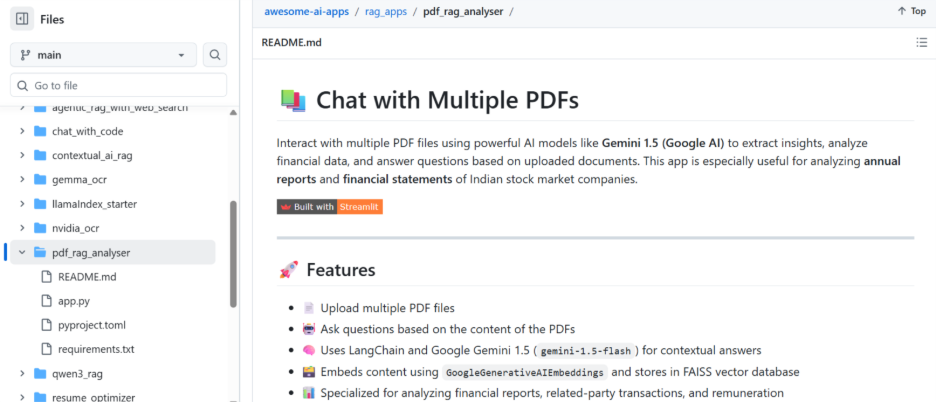
What it does: Upload a folder of PDFs, product manuals, policy documents, research papers, and chat with them. The agent retrieves the most relevant chunks and answers your question with references back to the source.
Why build it: This is the classic RAG (Retrieval-Augmented Generation) use case. If you work with lots of documents, this agent alone can save you hours a week.
How to build it: Use LangFlow’s visual builder. Feed PDFs into a vector database (like Chroma or Pinecone), set up a retrieval chain, and connect an LLM for generating answers. LangFlow converts the whole thing into a REST API automatically.
What you’ll learn: What RAG is and why it matters, how vector databases work, and how to build a retrieval pipeline visually.
Link to AI Agent Project on GitHub: https://github.com/Arindam200/awesome-ai-apps/tree/main/rag_apps/pdf_rag_analyser
3. Website Change Monitor with n8n
What it does: You give the agent a competitor’s URL in plain English (“watch TechCorp’s pricing page for any changes”). It scrapes the page, checks it again 24 hours later, compares the two versions using an LLM, and emails you only when something meaningful has changed.
Why build it: Competitive intelligence is valuable and tedious to do manually. This agent automates the boring part entirely.
How to build it: Use n8n’s workflow builder with Firecrawl for scraping, an OpenAI node for comparison, and a Gmail node for alerts. n8n has a ready-made template for this exact workflow.
What you’ll learn: How to schedule agents, how to use web scraping as a tool, and how to build alerting logic.
Link to AI Agent Project: https://n8n.io/workflows/4833-multiple-websites-monitoring-with-notifications-including-phone-calls/
AI Projects for Intermediate to Advanced Developers
These projects involve writing code and require some familiarity with Python, APIs, and general software development concepts.
4. Simple Tool-Calling Agent from Scratch
What it does: A command-line agent that can use tools, like searching the web, reading a file, or calling a calculator, to answer questions. You build the entire agent loop yourself.
Why build it: This is the most educational project on this list. Once you have built a tool-calling loop from scratch, every framework suddenly makes sense because you understand what they are abstracting away.
How to build it: Use the Anthropic API directly. Create a message array, define tools as functions, handle tool call responses in a while loop, and return the final answer. Roughly 100 lines of clean Python.
What you’ll learn: The agent loop, how tool definitions work, message history management, and how to handle tool call responses.
Link to AI Agent Project: https://microsoft.github.io/autogen/0.2/docs/notebooks/agentchat_function_call_currency_calculator/
5. Memory Agent
What it does: An agent that remembers things across conversations. You can tell it “my name is Priya and I prefer responses in bullet points” in one session, and it will remember that context in the next one.
Why build it: Most agents are stateless by default, they forget everything when the session ends. Memory is what separates a tool from an assistant.
How to build it: Use LangGraph with its MemorySaver checkpointer for in-session memory. For persistent memory across sessions, pair it with a simple vector database (like ChromaDB) that stores and retrieves user preferences and past context.
What you’ll learn: The difference between short-term and long-term memory, how to implement both, and the design trade-offs involved.
Check AI Agents Project: Memory agents
6. MCP-Integrated Agent
What it does: An agent that connects to tools via the Model Context Protocol (MCP), an open standard for connecting AI agent services to external services. You can build an agent that talks to your file system, your calendar, your browser, or any MCP-compatible service.
Why build it: MCP is becoming the standard way to give agents external capabilities. Understanding it now puts you ahead of the curve.
How to build it: Use Claude’s API with an MCP server. Define an MCP server that exposes tools, connect it to your agent, and let the agent discover and use those tools dynamically.
What you’ll learn: What MCP is and how it works, how to build MCP servers, and how agents discover and invoke external capabilities.
Check AI Agents Project: MCP-Integrated Agents
7. RAG-Powered Research Assistant
What it does: An agent that combines web search with a local knowledge base. Ask it to research a topic and it will pull from both your internal documents and live web results, synthesizing everything into a coherent answer with citations.
Why build it: This is a huge step up from basic RAG. The hybrid retrieval, local + live, makes the agent genuinely useful for research tasks that require both institutional knowledge and current information.
How to build it: Use LlamaIndex for document indexing, a web search tool (like Tavily or Firecrawl), and LangGraph to orchestrate which retrieval path to take based on the query. Pydantic AI works well here for structured output.
What you’ll learn: Hybrid retrieval strategies, how to route queries intelligently, and how to combine multiple data sources into one coherent response.
Check AI Agents Project: MCP-Integrated Agents
AI Projects for Enterprises
These projects are designed for teams building production-grade systems. They involve multi-agent architectures, robust error handling, security considerations, and integration with enterprise systems.
8. Multi-Agent Research Crew
What it does: A coordinated team of specialized AI agents that collaborates to produce comprehensive research reports. One agent searches and collects data, another analyzes and synthesizes it, a third fact-checks claims, and a final agent writes the polished output.
Why build it: Single agents hit limits on complex, multi-step tasks. When you split the work among specialists, each with a focused role, goal, and tool set, quality goes up dramatically. This is the architecture behind many of the most powerful AI systems being built today.
How to build it: CrewAI is purpose-built for this. Define each agent with a role, goal, and backstory, assign tasks, and let the Crew coordinate the handoffs. For more control over the execution graph, LangGraph is the better choice, letting you define exactly when and how agents pass work to each other.
What you’ll learn: Multi-agent orchestration patterns, how to divide complex tasks across specialized agents, how to handle handoffs, and how to aggregate outputs from multiple sources into one coherent result.
As a trusted multi-agent system development partner, teams like ours have seen this architecture cut research time from days to minutes on complex market intelligence tasks.
Link to AI Agent Project: Multi Agent Crew
9. Enterprise Knowledge Base Agent
What it does: A production-grade internal assistant that indexes all of an organization’s documentation, engineering docs, HR policies, product specs, sales playbooks, and makes it conversational. Employees ask questions in natural language and get accurate, sourced answers in seconds.
Why build it: The average knowledge worker spends hours a week searching for information they already have internally. A well-built enterprise knowledge agent eliminates most of that friction.
How to build it: Use LlamaIndex or LangGraph as the orchestration layer, Pinecone or Weaviate as the vector store, and deploy with proper access controls so agents only surface documents a given user is authorized to see. Add a feedback loop so the system improves based on thumbs-up/thumbs-down ratings.
What you’ll learn: Production RAG architecture, access control patterns, evaluation and feedback loops, and how to build for scale.
This is a flagship use case for any AI agent development company serving mid-market or enterprise clients. The ROI is measurable and fast.
Link to AI Projects on Github: Advanced AI
10. Agentic Automation Pipeline for Business Operations
What it does: An end-to-end automation system where agents handle entire business workflows autonomously, triaging customer support tickets, routing them to the right team, drafting initial responses, escalating edge cases to humans, and logging everything to a CRM.
Why build it: This is where agentic AI stops being a demo and starts being a business transformation. Full workflow automation with appropriate human-in-the-loop checkpoints is the gold standard of what an agentic AI automation development company delivers to enterprise clients.
How to build it: Use LangGraph for workflow orchestration (its graph model handles branching and loops elegantly), CrewAI for multi-agent coordination where different agents own different stages, and integrate with enterprise tools via MCP servers or direct API connections.
Add human-in-the-loop steps using LangGraph’s interrupt mechanism, the agent pauses, surfaces the decision to a human, and resumes once approved. This is critical for high-stakes actions like sending customer-facing communications or processing refunds.
What you’ll learn: Production-grade agent architecture, human-in-the-loop patterns, enterprise system integration, observability and logging, and how to design for reliability and error recovery.
Link to AI Agent Project: Agentic AI for business operations
How to Start Your Own AI Agent Project
If you are new to this space, here is the honest advice: resist the urge to start with the most impressive-sounding project. Start simple, build it until it actually works reliably, and then add complexity.
A rough path that works for most people:
Start by building a basic tool-calling agent from scratch using the Anthropic API or OpenAI API. No frameworks. Just you, the API, and a while loop. This demystifies how agents work and makes every framework easier to understand later.
Once you understand the fundamentals, pick one framework and go deep. LangGraph is the best choice if you want to build production systems. Pydantic AI is great if you prefer a cleaner, more lightweight experience.
Then start layering in complexity, memory, RAG, multi-agent coordination, one piece at a time. Every project on this list is a module. You do not have to build them in order, but building them in isolation first before combining them is the fastest path to real capability.
For teams looking to move fast on production deployments, partnering with an experienced AI development company that has already solved the infrastructure, evaluation, and reliability problems can dramatically shorten the path from prototype to production.
Conclusion
AI agents are not the future, they are right now. The tools are mature, the frameworks are stabilizing, and the use cases are proven. What has changed is that the barrier to entry has dropped to the point where a single developer can build something genuinely powerful in a weekend.
The projects in this guide cover the full spectrum, from no-code drag-and-drop prototypes to enterprise-grade multi-agent system development pipelines. Start wherever you are. Build something that solves a real problem. Iterate.
The biggest mistake you can make right now is waiting. The second biggest is trying to build everything at once. Pick one project, ship it, and learn from it. That is how the best builders in this space got good, and it is how you will too.
Whether you are an individual dedicated AI developers building your first agent or part of an enterprise team looking to work with a dedicated team to design and deploy production systems, the path starts with the same thing: building something real and learning from it.
FAQs
-
Do I need to know how to code to build an AI agent?
Not at all. While knowing Python or JavaScript gives you more control and customization, you can build fully functional agents without writing a single line of code. Platforms like Langflow, Flowise, and n8n let you drag and drop components, LLMs, databases, search tools, and wire them together visually. A working agent in under an hour, no terminal required.
-
What is the difference between a chatbot and an AI agent?
A chatbot responds to your message based on what it was trained on, it is reactive and limited to what it already knows. An AI agent goes further. It can use tools: search the live web, read your calendar, run code, query a database, send emails. The key difference is action. A chatbot answers. An agent gets things done.
-
What are some good Day 1 projects for a beginner?
The best first project is one that solves exactly one problem. A Personal Research Assistant that searches the web and summarizes news on a topic you care about is a great start. So is a PDF Conversationalist that lets you “chat” with your own documents using a simple RAG setup. If you want something more practical, try an Automated Email Responder that drafts replies by pulling context from your Notion or Google Docs. Pick one, finish it, then move on.
-
What tech stack should I use?
It depends on where you are starting from. If you want zero code, go with Langflow, Flowise, or Make.com. If you are a developer, LangChain or LangGraph handles orchestration well, and Firecrawl or Tavily covers web search. For multi-agent systems where multiple agents need to coordinate and pass work between each other, CrewAI and Microsoft AutoGen are the two tools most teams reach for first.
-
How much does it cost to run these projects?
Most platforms are free to start. The real cost comes from API tokens, what you pay the AI model (like GPT-4o or Claude) per request. For beginners, switching to smaller models like GPT-4o mini keeps costs close to zero. If you want to avoid API costs entirely, running local models via Ollama is free after the initial setup and works surprisingly well for most beginner projects.
-
Can I build agents that run locally on my computer?
Yes, and it is easier than most people expect. Tools like Ollama and llama.cpp let you run the entire “brain” of your agent on your own hardware without sending any data to an external API. This is the right choice if data privacy is a concern or if you want to keep ongoing costs at zero. Performance depends on your machine, but modern local models are more than capable for most personal and small-scale projects.
-
What are “guardrails” and why do I need them?
Guardrails are rules and constraints you set to control what an agent can and cannot do. Without them, an agent might take unintended actions, sending a half-written email, deleting the wrong file, or going off-topic in unpredictable ways. Think of guardrails as the safety layer between your agent’s autonomy and real-world consequences. The more tools and permissions your agent has, the more important guardrails become.