Most people who ask “how do I build an AI agent?” already understand what an AI agent is. What they don’t know is where the architecture ends and the guesswork begins.
That’s the real problem not the concept, but the construction. Because building an AI agent isn’t one decision. It’s a sequence of architectural choices, each one shaping what your agent can actually do in production.
This guide walks you through every layer of that process ,from understanding what makes an agent different from a simple LLM call, to deploying one that behaves reliably at scale.
What Is an AI Agent, really?
Before writing a single line of code, get this distinction right.
A standard LLM interaction is stateless. You send a prompt, you get a response. Done.
An AI agent development services is different. It perceives its environment, decides what to do, takes an action, observes the result, and loops — until the task is complete. That loop is what makes it an agent.
Think of it like this: a chatbot answers questions. An agent solves problems.
According to research from McKinsey, autonomous AI agents are projected to handle up to 70% of repetitive knowledge work by 2028. That’s not a distant forecast — enterprises are already building production-grade agents for customer operations, code review, data analysis, and more.
Here’s why this distinction matters for builders: if you treat agent development like prompt engineering, you’ll hit a ceiling fast. Agents require architecture, not just instructions.
The Core Components of an AI Agent
Every AI agent — regardless of framework or use case — is built from five foundational components.
Let me visualize this before we go deeper.
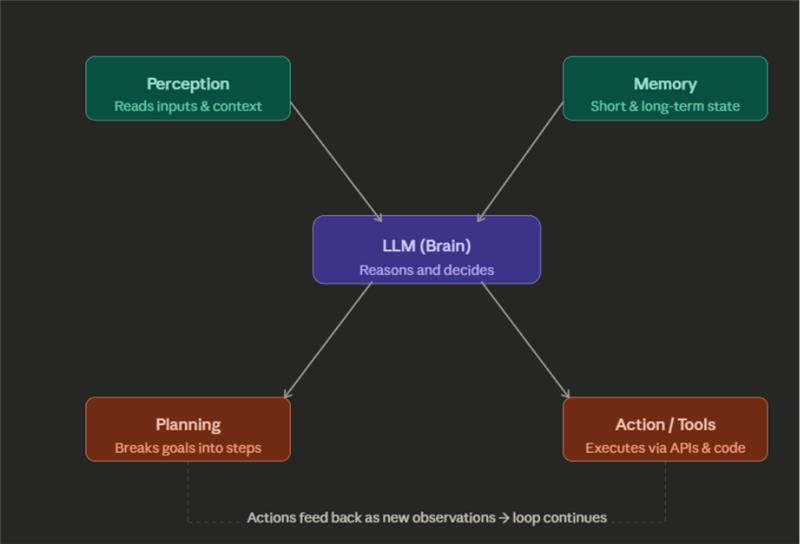
Here’s what each component actually does:
The LLM (Brain) is the reasoning engine. It interprets inputs, decides what action to take next, and generates responses. GPT-4o, Claude 3, and Gemini are all common choices here. The LLM doesn’t just answer — it plans.
Perception is how the agent reads its environment. This includes user messages, tool outputs, file contents, API responses, or web data. Essentially, anything the agent can observe is a perception input.
Memory is where most builders underinvest. There are two types: short-term (within a session, stored in the conversation context window) and long-term (stored externally — databases, vector stores like Pinecone or Weaviate). Without memory architecture, your agent forgets everything between sessions.
Planning is the agent’s ability to decompose a complex goal into smaller sub-tasks and sequence them logically. This is where frameworks like ReAct (Reason + Act) and Chain-of-Thought prompting become structurally relevant.
Action / Tool Use is the output layer. The agent uses tools — APIs, code interpreters, web search, database queries, file systems — to execute its decisions in the real world.
Step 1: Define the Agent’s Scope
This step gets skipped constantly. Don’t.
Before you pick a framework or write any code, define:
- One primary task. What exact problem does this agent solve? The narrower, the better for v1.
- What decisions it needs to make. Which decisions are in-scope for the LLM, and which should be hardcoded?
- What tools it needs access to. List every external system it might call.
- What it should never do. This shapes your guardrails.
Here’s why this matters: over-scoped agents fail unpredictably. An agent tasked with “manage my inbox” without clear boundaries will hallucinate actions you didn’t authorize. Specific scope means predictable behaviour.
Step 2: Choose Your Framework
You don’t need to build agent infrastructure from scratch. Several mature frameworks exist.
| Framework | Best For | Key Strength |
| LangChain | General-purpose agents | Large ecosystem, modular tooling |
| LlamaIndex | Knowledge-heavy agents | Superior RAG and data connectors |
| AutoGen (Microsoft) | Multi-agent systems | Agent-to-agent communication |
| CrewAI | Role-based multi-agent teams | Human-readable agent roles |
| OpenAI Assistants API | GPT-native agents | Built-in threads, tools, and retrieval |
For most teams building their first agent, LangChain with LangGraph is the standard starting point. LangGraph adds stateful, graph-based orchestration — which is critical once your agent needs to loop, branch, or coordinate across multiple tools.
If you’re in a knowledge-intensive domain — legal, finance, support — lean toward LlamaIndex. Its document ingestion and retrieval pipeline is significantly more capable for RAG-heavy workflows.
Step 3: Set Up the LLM and Tool Layer
This is where you write your first real code.
Let’s simplify this with a concrete pattern using LangChain and OpenAI:
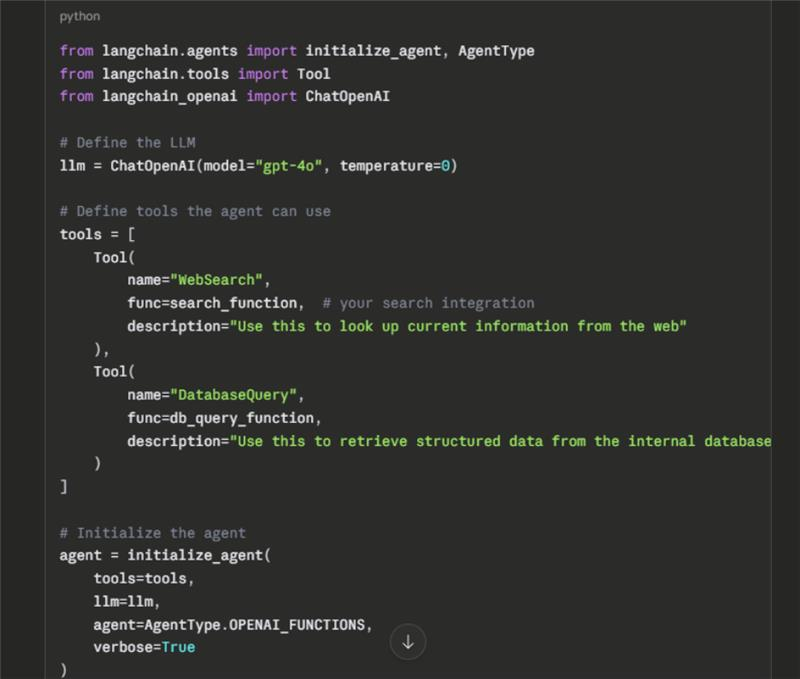
A few things to get right here. First, tool descriptions matter more than most developers think. The LLM reads those descriptions to decide when to use a tool. Vague descriptions lead to wrong tool calls. Write them like you’re explaining the tool to a precise, literal colleague.
Second, set temperature=0 for agents that need consistent, deterministic behavior — especially for production workflows. Creative tasks can tolerate higher values; operational agents usually can’t.
Step 4: Build the Memory Architecture
Here’s how to think about memory at each layer:
In-context memory is everything in the active conversation window. LangChain handles this through ConversationBufferMemory or ConversationSummaryMemory. The summary version is important for long sessions — it compresses older context to save token budget.
External (long-term) memory requires a vector database. The typical setup:
- Embed your knowledge base (documents, past interactions, structured data) using a model like text-embedding-3-small
- Store vectors in Pinecone, Weaviate, Chroma, or pgvector (if you’re already on PostgreSQL)
- At runtime, retrieve semantically relevant memory chunks and inject them into the agent’s context window
This is what transforms a stateless assistant into an agent that learns from prior sessions and adapts behavior over time.
Step 5: Implement the Reasoning Loop
The agent loop is the operational core. Here’s the pattern most production agents follow:
This loop — observe, think, act — is what distinguishes ReAct agents (Reason + Act) from simple prompt-response patterns. The agent doesn’t just answer once. It runs this cycle until it decides the task is complete or hits a stop condition.
One critical implementation note: always define a max iteration limit. An agent that loops indefinitely is a production incident waiting to happen. Set it explicitly in your framework config.
Step 6: Define Guardrails and Safety Logic
Most builders treat this as optional. It isn’t.
Production agents need three types of controls:
Input guardrails filter what the agent accepts. This includes content moderation, schema validation for structured inputs, and scope filtering (does this request fall within the agent’s designed task?).
Output guardrails validate what the agent produces before it’s sent or executed. For code-executing agents, sandboxing is non-negotiable. For customer-facing agents, tone and compliance checks apply here.
Escalation logic defines when the agent should stop and hand off to a human. The rule of thumb: if the agent’s confidence is below a threshold, or the task involves irreversible actions (financial transactions, data deletion, external communications), require human-in-the-loop confirmation.
According to Gartner’s 2024 AI report, over 60% of enterprise agent failures trace back to insufficient guardrails — not model capability gaps. The model can reason. The architecture needs to constrain it appropriately.
Step 7: Test Across Failure Modes
Standard unit tests aren’t enough for agents. You need to test how the agent behaves when things go wrong.
Test for these specific failure scenarios:
Tool failure. What happens when an API the agent depends on returns an error or times out? The agent should gracefully retry or inform the user — not hallucinate an answer.
Ambiguous instructions. Give the agent an under-specified task. Does it ask for clarification, or does it make a dangerous assumption?
Prompt injection. If your agent reads external content (emails, web pages, documents), adversarial text embedded in that content can attempt to hijack the agent’s behavior. Test this explicitly.
Infinite loops. Craft scenarios where the agent’s goal is genuinely unclear. Does it hit your max iteration limit cleanly, or does it spiral?
A practical way to run this: build an eval harness using a dataset of ~50 real edge-case inputs. Run it on every model or prompt change. Tools like LangSmith (from LangChain) make this significantly easier to operationalize.
Step 8: Deploy and Monitor
An agent in development is a prototype. An agent in production is a system.
For deployment, the most common patterns are:
Serverless functions (AWS Lambda, Google Cloud Functions) work well for event-driven agents that respond to triggers — a new email, a form submission, a database change.
Containerized services (Docker + Kubernetes) are better for agents that need persistent state, warm compute, or high-throughput workloads.
For observability, instrument these four things from day one:
- Token usage per run (cost control)
- Latency per tool call (performance bottleneck identification)
- Tool call success/failure rates (reliability signals)
- User feedback or task completion rates (quality measurement)
LangSmith, Langfuse, and Helicone are the most widely adopted observability tools in the current stack.
The Multi-Agent Pattern: When One Agent Isn’t Enough
Single agents work well for focused tasks. Complex workflows — especially those requiring parallel processing or specialized expertise — often benefit from a multi-agent architecture.
Here’s how to think about it:
A supervisor agent s(orchestrator) receives the top-level task and delegates to specialist agents. Each specialist agent has a defined role and its own tool access. Results flow back to the supervisor, which synthesizes them and determines the next step.
This is the pattern behind enterprise use cases like automated research pipelines, code review systems, and financial analysis workflows. Frameworks like AutoGen and CrewAI are specifically built for this architecture.
The tradeoff: more agents mean more complexity, more latency, and more failure points to manage. Start single-agent. Expand only when you’ve hit a genuine capability ceiling.
Quick-Reference Build Checklist
| Phase | What to Complete |
| Scoping | Define task, tools, decisions, and guardrails |
| Framework | Select LangChain, LlamaIndex, CrewAI, or equivalent |
| Tool layer | Implement and describe all tools precisely |
| Memory | Configure in-context + external vector memory |
| Reasoning loop | Implement ReAct or equivalent with max iteration cap |
| Guardrails | Add input validation, output checks, escalation logic |
| Testing | Run failure-mode evals across tool errors, injection, ambiguity |
| Deployment | Containerize or serverless; add observability from day one |
What Comes Next: Where Agent Development Is Heading
A few directions worth tracking as you build:
Long-horizon planning is becoming a focus area. Models are getting better at maintaining coherent goal structures across many steps — which directly expands what agents can handle without breaking down.
Multimodal agents — agents that perceive and act on images, audio, and video, not just text — are moving from research into production. Adobe, Salesforce, and several enterprise platforms are already embedding them into core workflows.
Standardization of agent infrastructure is happening faster than most expect. The emergence of protocols like Anthropic’s Model Context Protocol (MCP) signals that the industry is converging on interoperable, composable agent infrastructure rather than isolated, one-off implementations.
The underlying message: what you build today with agents will be foundational, not disposable. The patterns you establish — memory architecture, tool design, guardrail logic — will carry forward as the capabilities scale.
Conclusion
Building an AI agent isn’t hard once you understand that it’s an architecture problem, not a prompt problem.
The core decisions — how the agent perceives its environment, how it plans and reasons, which tools it can call, how it remembers context, and how it fails safely — determine whether you ship something that works in production or something that impressively demos and unpredictably breaks.
Start narrow. Get one loop working reliably. Instrument everything. Then expand.
The agents worth building aren’t the most capable ones on paper. They’re the ones that behave predictably, fail gracefully, and earn trust through consistent performance — which is an engineering discipline, not a model selection.
Frequently Asked Questions
What is the simplest way to build an AI agent for a beginner?
Start with the OpenAI Assistants API or LangChain’s LCEL (LangChain Expression Language). These give you an agent loop, tool calling, and memory management with minimal infrastructure setup. Build a single-tool agent first — for example, one that can search the web or query a database — before adding complexity.
What’s the difference between an AI agent and a chatbot?
A chatbot responds to a prompt in a single turn. An AI agent takes a goal, plans the steps required to achieve it, executes actions across multiple tools and systems, and loops until the task is complete. The core distinction is autonomous multi-step decision-making.
Which LLM should I use for building an AI agent?
For reasoning-heavy agents, GPT-4o and Claude 3.5 Sonnet are the current production standards. For cost-sensitive, high-frequency agents, GPT-3.5 Turbo or Claude Haiku offer faster and cheaper inference with acceptable performance on well-scoped tasks. The model choice should follow the task requirements, not the other way around.
How do I give my AI agent long-term memory?
Use a vector database such as Pinecone, Weaviate, or Chroma to store embedded representations of past interactions, documents, or structured data. At each new session, retrieve the most semantically relevant memory chunks and inject them into the agent’s system prompt or context window.
How do I prevent an AI agent from making dangerous decisions?
Define explicit guardrails at the input and output layers. Use structured output validation, set a max iteration limit on the reasoning loop, and build escalation logic that routes high-risk decisions to a human. For any agent that interacts with external systems, apply the principle of least privilege — give it only the tool access it actually needs.
What is the ReAct pattern in AI agents?
ReAct stands for Reason + Act. It’s a prompting and execution pattern where the agent alternates between reasoning steps (thinking about what to do next) and action steps (calling a tool or producing an output). This interleaving of thought and action is what allows agents to handle complex, multi-step tasks more reliably than pure generation approaches.
Can I build an AI agent without coding?
Yes, to a degree. Platforms like Zapier AI, Make (formerly Integromat) with AI steps, and no-code agent builders from vendors like Cohere and Relevance AI allow you to configure agents through visual interfaces. However, for production-grade reliability, custom logic, or proprietary tool integration, code-based implementation remains significantly more capable and controllable.